 ASTRUM
 Scan with context
QR Scanner
See where a QR code leads.
Scan QR codes and barcodes, review the destination, and decide what to open.
View on the App StoreSee the App Store for current features, compatibility, and purchase details.
GET TO KNOW THE APP
What you can do with QR Scanner.
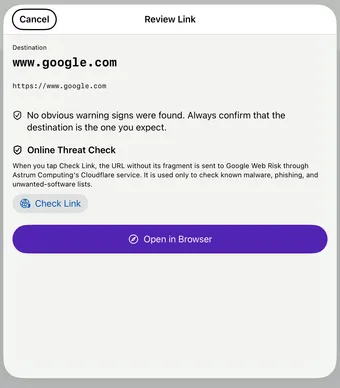
A QR code should give you context before it takes you somewhere. QR Scanner brings camera scanning, photo scanning, link review, and your scan history together.
Scan from camera or photos
Read a printed code with your camera, or scan a QR code saved in a photo or screenshot.
Review before opening
See the destination and common warning signs before choosing to continue. Online reputation checks require QR Reader Pro and are advisory; they cannot guarantee safety.
Keep useful codes
Search your scan history, add notes, and favorite codes you want to find again.
PRACTICAL HELP
QR Scanner guides.
- What to check before opening a QR code link
A practical checklist for reading the destination of a QR code and spotting reasons to pause before you open an unfamiliar link.
- How to scan a QR code from a photo on your iPhone
Have a QR code in a screenshot or saved photo? Read it on the same iPhone, then review the result before opening a website.
Good to know.
Does a safety check guarantee a link is safe?
No. Checks are advisory. Confirm that the destination is the one you expect before opening it.
Can I scan a code already on my phone?
Yes. You can scan QR codes from photos as well as the live camera.